Before configuring Directory Services on the FlashArray side, certain objects need to be created in Active Directory. Also, Review the available RBAC Roles and create only the AD security groups relevant to your organization.
-
In Active Directory, create or define an Organizational Unit (OU). You may use an existing OU. If you decide to create a new OU, it can be named virtually anything. After creating the OU, you may gather the address by using
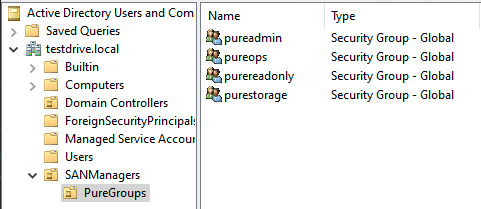
dsquery, as in the following example:C:\Users\Administrator>dsquery ou -name *pure* "OU=PureGroups,OU=SANManagers,DC=testdrive,DC=local"From that output, you'll need only note OU=PureGroups,OU=SANManagers for filling out the Group Base information in the Directory Services Configuration. The following shows what the structure in AD may look like:
-
In Active Directory, create the Pure Groups. You'll now need to populate the OU with Pure Groups. It's wise to use a descriptive name for the groups. The Groups can be it can be named virtually anything. The example below uses the following: pureadmin, purestorage, pureops, and purereadonly. These groups must exist within the OU created or defined above, in Step 1. Later in the configuration of the array side, you'll define these groups. Make note of them.
-
In Active Directory, define users as members of the Pure Groups. This can be accomplished by adding individual users or by adding existing groups as a members of the Pure Groups. When an existing group is added to the new Pure Groups, they automatically inherit permissions of the parent group. Note: Do not make a user a member of more than a one Pure Group. If you do this, the user's permissions on the FlashArray will be restricted to the lowest group.
The following images show the addition of users to a Security Group and the addition of a group to a Pure Group: