For secure hybrid connectivity, extending on-premises networks to Azure. Azure site-to-site VPN gateways are an easy and fast deployment option to configure. It can help connect your datacenter infrastructure (FlashArrays) to your VNets (i.e. where Everpure Cloud Dedicated resides) securely.
Similarly, you can use Azure site-to-site VPN to connect to other cloud providers for multi-cloud connectivity. An example is provided in the above section for Azure to AWS replication topology, where two Everpure Cloud Dedicated instances can be connected.
Prerequisites
- Everpure Cloud Dedicated is deployed on Azure. If not, follow the Introduction, prepare the prerequisites, and deploy.
- For Hybrid only:
- FlashArray is implemented, and replication interfaces are configured. Check Asynchronous Replication Configuration and Best Practices
- Check if VPN devices in your datacenter are valid. For information about compatible VPN devices and device configuration, see About VPN Devices.
- Verify that you have an externally facing public IPv4 address for your VPN device
- For MultiCloud: Everpure Cloud Dedicated is deployed on AWS. See Introduction
- Make sure private IP address space (CIDR) of the Azure VNet is not overlapping with the on-premises network subnet or AWS VPC CIDR block.
Design Recommendation
- One of the recommended architectures of secure hybrid networks is to establish Hub and Spoke topology, which works by implementing a perimeter network (DMZ). For more information, refer to this reference architecture.
- In case, the cross-connectivity requirements are bandwidth and latency specific and are based on service-level agreements (SLAs). ExpressRoute might be a better option. It requires more dedicated circuits and complex setup than VPN gateway. However, it provides communication over a private network, higher throughput, and lower latency. The figure below is referenced from an Azure cloud adaptation framework documentation that can help you to decide which option to consider.
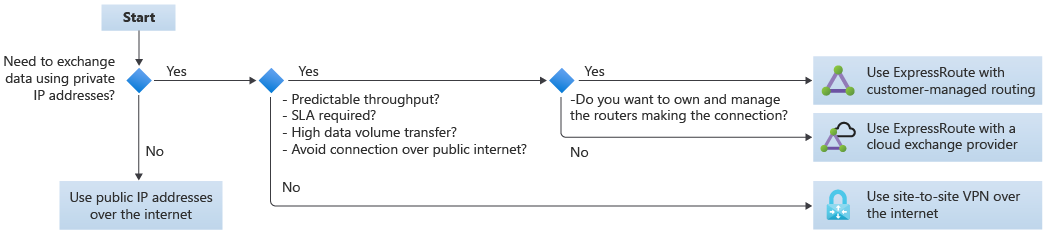
Configuration
The following are high level configuration steps, more details are linked in each step that refers to Pure and Microsoft documentation.